
For organizers
Tournament co-organizer: run the tournament together
A tournament co-organizer joins the event from their own account. The club, the school or the parent committee work together, and you don't have to be everywhere.
What you get
Shared work
Several people run the tournament, each from their own account.
No shared account
You invite a specific person instead of sharing one account.
A clear status
You see who has accepted the invitation and who hasn't yet.
How it works
- 1
Search for the person
By first or last name in FC.APP.
- 2
Send an invitation
The invited person gets a notification.
- 3
Work together
Once they confirm, the co-organizer is in the tournament.
A tournament is a job for several people
A youth tournament is rarely organized by one person. A club coach helps, someone from the school, parents from the committee. The trouble starts when everyone uses one account, or when only one person can change anything. In FC.APP, every tournament co-organizer works from their own account, and you know who has access.
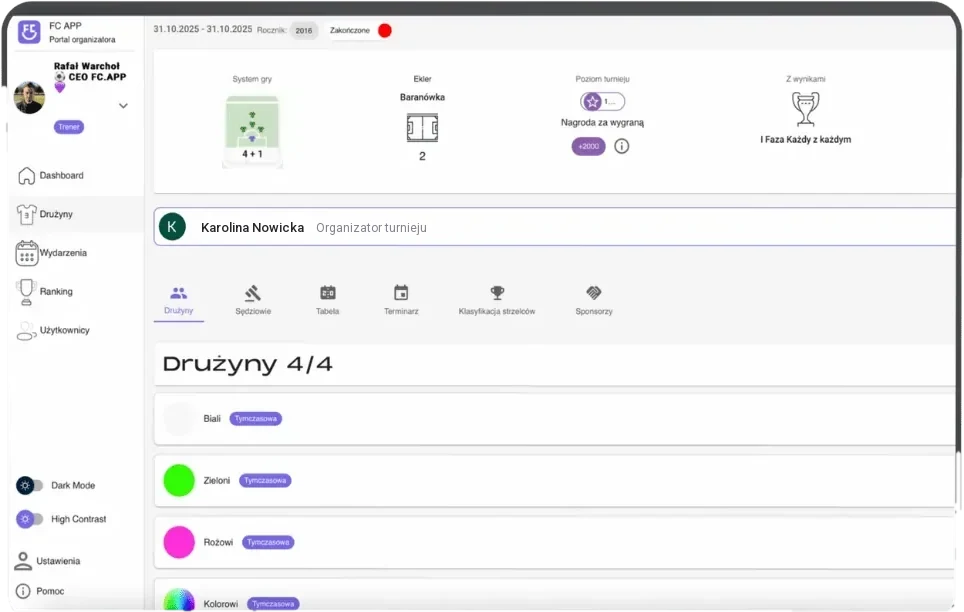
You add a co-organizer in the tournament details. You search for the person by first or last name and send an invitation. On the organizer list, you see their photo, first and last name, city and status: "Sent" until the person replies, and "Confirmed" once they join. The invitation is accepted in the browser version of FC.APP. When someone stops helping, you remove them from the list. You don't have to keep track of who still has access to a shared account or change anything after a helper leaves, because there is no such account.
This lets you split the work the way a real team does. One person collects registrations with one link, another keeps an eye on the game plan, and referees enter scores from the fields on their own phones. Everything happens in the same tournament, so you don't send each other files or photos of score sheets. Everyone sees the same state of the tournament: registered teams, pools, the schedule and the scores. No one has to call the main organizer to ask whether the plan is ready yet.
Everyone works where it suits them, because the soccer tournament app works in the browser and on the phone, in sync. A change made by one organizer is visible to the others right away. One person can build the plan at their computer at home while another checks the details on their phone at the facility where the tournament will be held.
Frequently asked questions
How do I add a tournament co-organizer?
In the tournament details, you search for the person by first or last name and send an invitation. The invited person has to accept it.
Where does a co-organizer accept the invitation?
In the browser version of FC.APP.
How do I know whether a co-organizer has joined?
On the organizer list, you see the invitation status: "Sent" or "Confirmed".
Can I invite several people at once?
You invite one person at a time, but you can have several co-organizers.
Does a co-organizer need their own account?
Yes. Every co-organizer works from their own FC.APP account, so you don't share one account.
Can I remove a co-organizer?
Yes. In the organizers tab, you can remove the person from the list.